

The problem with how agents read codeh2
Every AI coding agent in 2026 does the same thing when you ask a structural question: it reads your files. Every single time.
Ask Claude Code, Cursor, or Cline something like “What calls processOrder?” and watch the terminal. The agent opens a file, scans it line by line, finds an import, opens another file, and keeps going. It can easily burn 20,000 tokens on raw source code just to trace a single caller relationship. Start a new session five minutes later and ask the same question, and it does the whole thing again from scratch. It retained nothing.
This is not a model intelligence problem. Frontier models like GPT-5, Claude Sonnet 4.5, or Gemini 3.1 Pro reason incredibly well. The issue is the interface layer between the agent and your codebase. The agent receives unstructured text when it needs structure. It gets raw files when it needs call relationships. A massive stream of data, when what it actually wanted was a single connection.
Why bigger context windows are not the answerh2
The obvious fix is a larger context window. A million tokens sounds like plenty. But research keeps showing that throwing more context at agents does not make them better, it often makes them worse.
A Chroma Research study, “Context Rot: How Increasing Input Tokens Impacts LLM Performance” (July 2025) tested 18 frontier models across repository-scale tasks. Every model showed measurable performance degradation as input length grew, not a sudden cliff at the end of the context window, but a steady, continuous decline in reasoning quality. A separate 2025 study on long-context models found this degradation happens even when retrieval is perfect. The problem is not whether the right information is in the context. It is how much irrelevant noise surrounds it.
When you flood an agent’s context with raw file content, it has to spend its attention parsing boilerplate code, comments, and imports just to find the one relationship it needed. The more files it reads, the more its accuracy on the next step drops.
The academic research on this has been converging on a common answer. GraphCoder (Liu et al., 2024) proposed retrieving code contexts via a structural graph rather than text similarity, yielding a +6.06 improvement in exact-match code completion while using less time and memory. CodexGraph (Liu et al., 2024) built on that by replacing file-reading with structured graph queries against a codebase-wide code graph. Both studies reached the same conclusion: for repository-scale tasks, structure beats raw text.
The Jail House Lock problemh2
If you have read or watched JoJo’s Bizarre Adventure Stone Ocean, you know exactly what this failure mode feels like.
There is a Stand named Jail House Lock, used by Miu Miu. Its ability is simple but terrifying: it limits its victim to holding only three new pieces of information in their working memory at a time. Learn a fourth thing and the first one disappears. The victim is not made less intelligent. Their reasoning remains intact. They just cannot hold enough context to act on what they know.

This is exactly what happens to AI coding agents today.
A medium-sized codebase is typically on the order of hundreds of thousands to a few million tokens (roughly 500k–2M), depending on language and code density. An agent cannot fit all of that into context, so it reads files one at a time, forgets what it read three files ago, and makes architectural decisions based on whatever fragment happens to be in its memory right now.
Miu Miu’s strategy in the story is to flood Jolyne with distractions, like counting individual bullets or reading prison signs, so the crucial details get pushed out. Every file an agent reads that is not directly relevant to the task works the same way, pushing out the structural map of your codebase.
Jolyne’s solution is elegant. She stops trying to memorize individual facts and instead learns to look at a reflected image in a mirror to see all the bullets at once, compressing many facts into a single unit.
That is the core idea behind Cortex. It pre-computes the structural relationships in your codebase and serves them as a single, compressed unit. The agent gets a complete answer about callers, callees, or blast radius in one response costing a few hundred tokens. Its context window stays free for actual reasoning.
How agents work today vs. how they should workh2
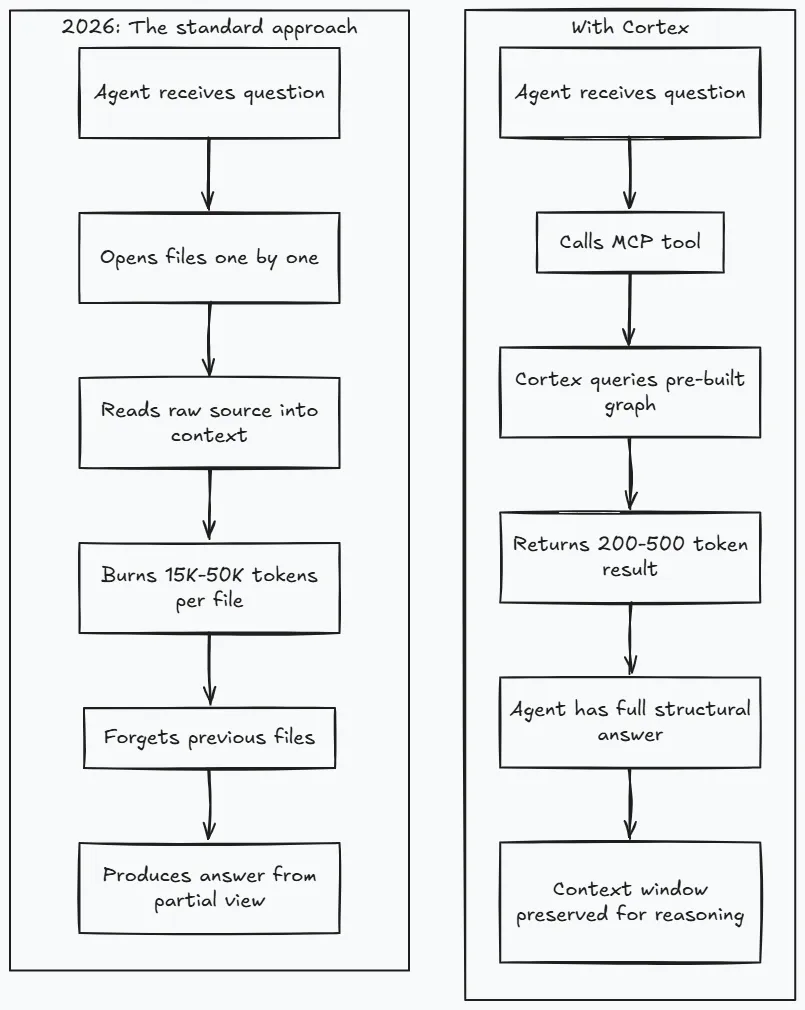
The difference is not incremental. If you ask an agent what breaks if you change a core database pool function, the standard approach forces the agent to trace imports recursively across dozens of files. That can easily cost tens of thousands of tokens (e.g., 20k–100k). Cortex answers that same query with a breadth-first traversal in less than 1,000 tokens. That represents a 100x reduction on a single query.
Over a typical coding session where an agent makes 20 to 40 structural queries, the savings compound. The agent stays within its context budget and can actually reason about the answers instead of forgetting them.
What is actually in the landscape right nowh2
Before looking at how Cortex works, it is worth exploring what else exists in the developer tool space and where each approach makes compromises.
- Repomix: The most popular tool by stars, Repomix packs your entire repository into a single, clean text file with token counting and security checks. The constraint is that it is a one-shot dump. The agent still reads everything. There is no session memory, no delta awareness, and no structural query interface. It works well for small projects, but it quickly fills up the context window on larger codebases.
- LeanCTX: A highly feature-complete tool. It includes delta reads, shell output compression, session checkpoints, and a dashboard showing token savings. Its main challenge is complexity: it exposes ~58 different tools (as of Q1 2026), which creates a large system prompt overhead for the agent.
- codebase-memory-mcp: Built in Zig, this tool performs call graph tracing, cross-service HTTP linking, and dead code detection. It has a fast setup but lacks cross-session memory and shell output compression.
- Engram: Operating entirely locally without GPUs or cloud APIs, Engram intercepts file reads and returns structural summaries instead of full file content. It is extremely efficient but is limited to a few core languages.
- Serena: This tool uses the Language Server Protocol (LSP) to provide highly precise type information. It excels at type-level queries but requires setting up and running active language servers for each language in your project, making it more complex to deploy.
None of these tools combine graph-based structural intelligence, cross-session memory with automatic staleness invalidation, built-in security analysis, and a zero-dependency binary that configures itself for multiple agents.
What Cortex actually ish2
Cortex is a single Rust binary. It does not require a Python runtime, Docker, cloud API keys, or active language servers. When you run cortex index, it uses tree-sitter to parse your repository, extracting functions, classes, call edges, import relationships, and data flows, storing them in a local SQLite database. When you run cortex serve, it exposes this structural graph over the Model Context Protocol (MCP) using a standard JSON-RPC 2.0 stdio interface.
Any MCP-compatible agent can connect to it immediately. This includes Claude Code, Cursor, Copilot, Cline, Zed, JetBrains, and many others. The agent can use 32 granular tools, or run in smart mode where a single ask meta-tool routes requests internally.
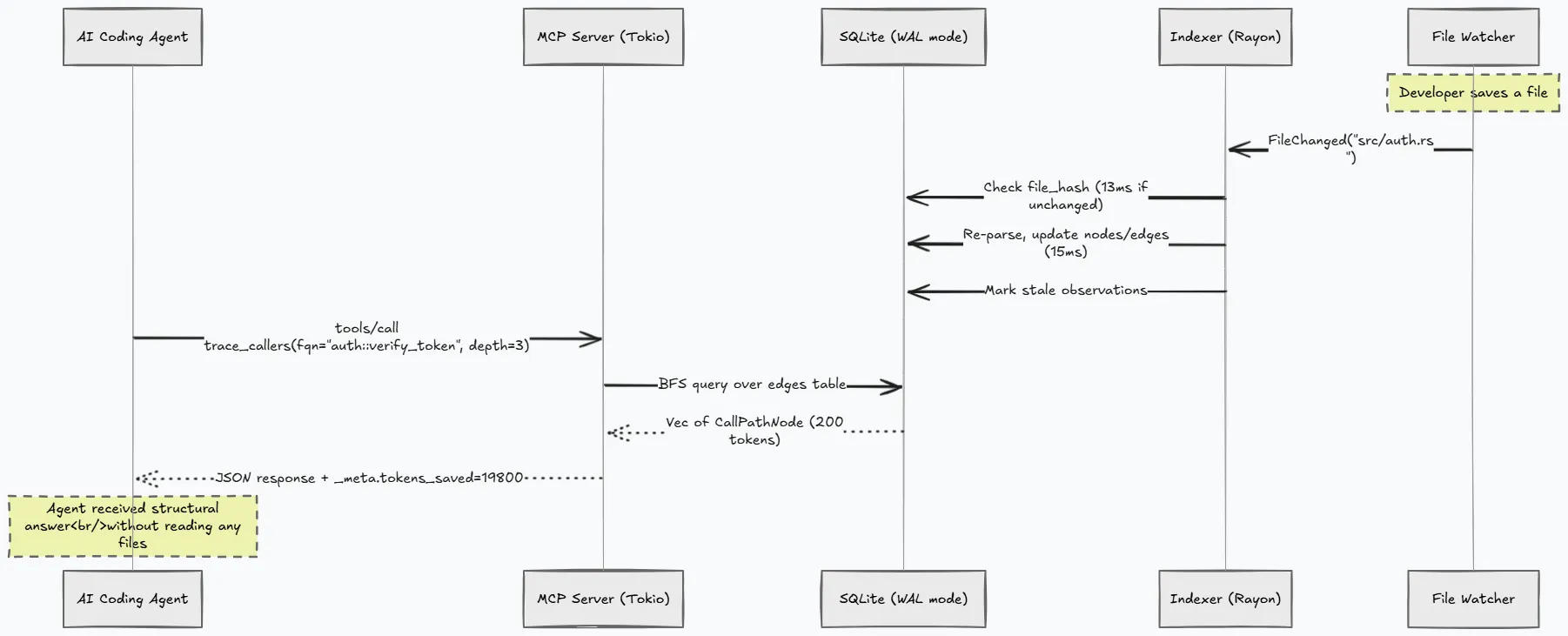
The graph stays updated automatically. A background file watcher listens for native OS file events and triggers incremental re-indexing whenever you save a file. Re-indexing a changed file takes less than 15 milliseconds, ensuring the agent always queries current code.
# Set up Cortex in under 30 secondsnpx @1337xcode/cortex install # downloads binary, detects agents, writes configcortex index # builds the call graph (127 files in 535ms)The installer detects your active IDEs and agents, writing the correct configuration entries automatically without requiring manual JSON editing.
Who uses this and whyh2
Cortex is designed for a few distinct development workflows:
- Vibe Coders: Developers who rely heavily on AI agents to write code. For these users, Cortex prevents the agent from getting lost in large codebases. The agent has a structural map, so it makes fewer mistakes and stays oriented during long coding sessions.
- Senior Architects: Teams that need to map out legacy systems. Cortex can generate architectural overviews, find dead code, and run community detection to visualize how modules are coupled in reality versus their intended design.
- Migration Engineers: Developers tasking agents with refactoring legacy code. Cortex helps the agent calculate the blast radius of changing a function, showing exactly how many upstream files will be affected before a line of code is modified.
- Security & Platform Teams: Teams that want basic security scans without setting up heavy SAST pipelines. Cortex can scan for OWASP patterns, trace user input to sensitive sinks, and generate SPDX SBOMs locally.
Architecture: three subsystems in one processh2
Cortex runs three concurrent subsystems inside a single process:
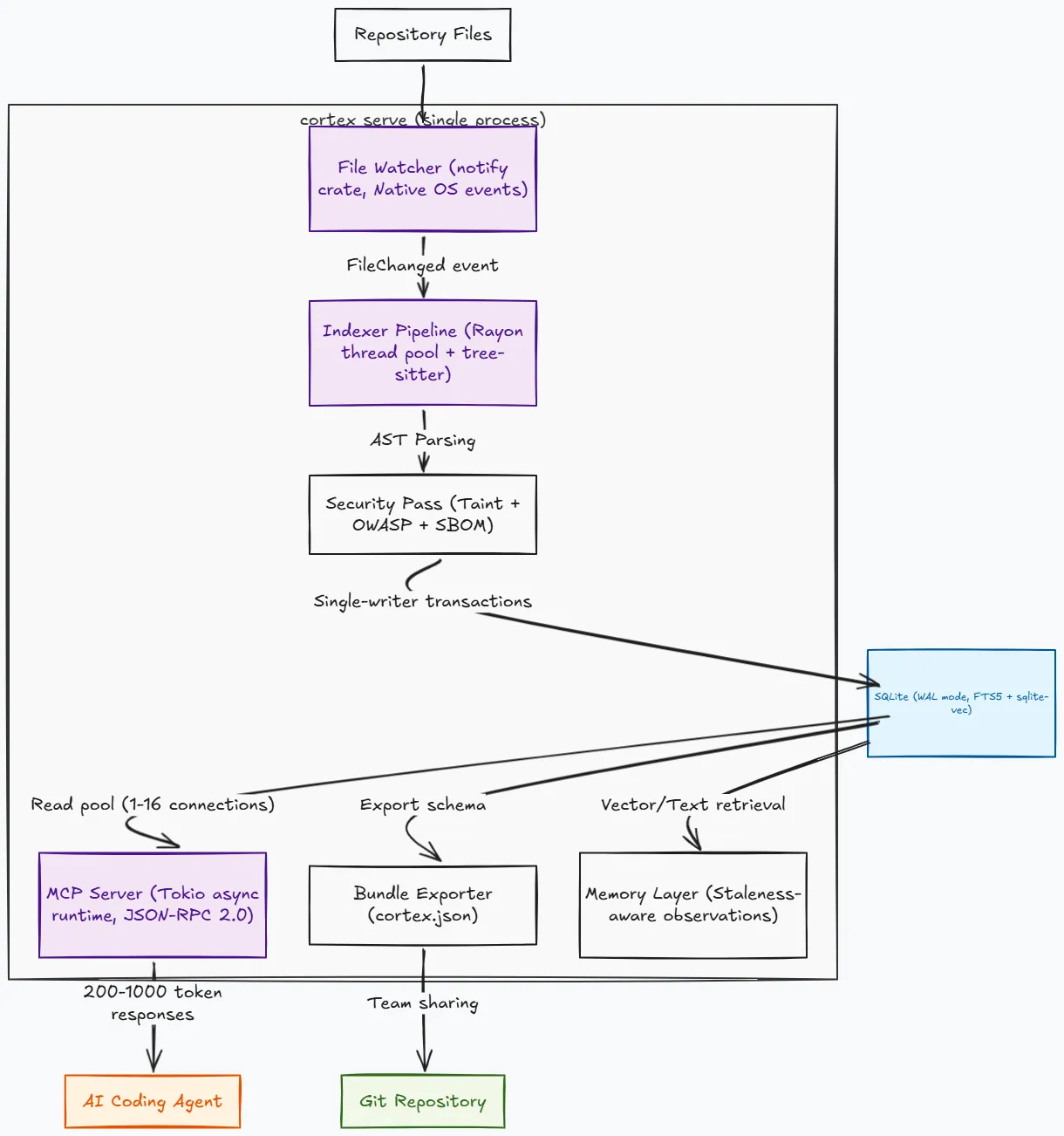
- The Indexer: Walks the filesystem, parses source files in parallel using Rayon, extracts symbols and edges, and writes them to SQLite. It uses a two-pass resolution strategy for cross-file call edges: the first pass collects definitions to build a symbol table, and the second pass resolves call targets against it.
- The File Watcher: Uses the
notifycrate to listen to native OS events likeinotify,FSEvents, orReadDirectoryChangesW. When you save a file, it tells the indexer to re-process only that file. If the SHA-256 hash of the file is unchanged, the update completes in about 13 milliseconds. - The MCP Server: Runs on a Tokio async runtime to handle concurrent tool requests. It communicates over stdio using JSON-RPC 2.0. SQLite’s Write-Ahead Logging (WAL) mode enables readers to query the database concurrently without blocking the indexer writes.
The Indexer Pipelineh2
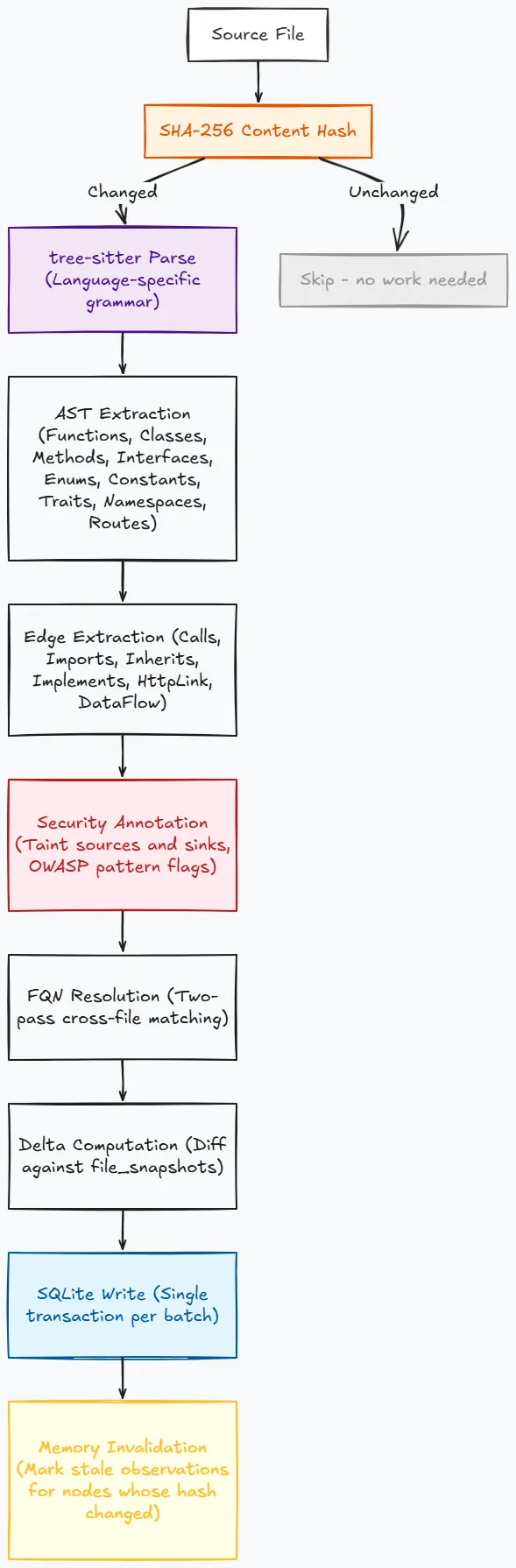
The indexer supports 29 languages. 26 use compiled tree-sitter grammars that are statically linked into the binary (no runtime downloads, no external grammar files). Three languages (Kotlin, SQL, Perl) use regex-based extraction as a fallback because their tree-sitter grammar crates have version conflicts with the rest of the tree-sitter ecosystem.
Languages are tiered by extraction quality based on how much structural information the grammar queries can extract:
- Tier 1 (Full call graph, imports, routes): Python, TypeScript, JavaScript, Rust, Go, and Java. These are the languages where Cortex’s structural analysis is most complete. If your codebase is primarily in one of these languages, you get the full benefit of blast radius analysis, taint flow tracing, and cross-file call resolution.
- Tier 2 (Symbols + partial call edges): C#, C++, Ruby, Swift, Scala, PHP, and Dart. The graph is useful but may miss some indirect calls or complex dispatch patterns.
- Tier 3 (Symbol extraction, limited edges): The remaining languages (Haskell, Elixir, Lua, Zig, Bash, R, Objective-C, OCaml, Julia, HCL/Terraform, YAML). You still get function and class definitions indexed, searchable, and visible in the architecture overview. However, call graph edges are sparse.
Parsing is parallelized with Rayon. Each file gets its own tree-sitter parser instance on a thread pool worker. The work-stealing scheduler means fast files do not block slow files. For a 3,500-file Python project (the CPython standard library), full indexing completes in under 60 seconds. A typical 100-file web application takes about 500ms. Large repositories (50K+ files) are processed in batches of 500 to avoid memory exhaustion.
The tree-sitter grammars are compiled from source at build time via the cc crate (each grammar crate includes its own build.rs). No network downloads occur during compilation. All 26 grammar C sources are vendored within their respective crates.
The database schemah2
Cortex uses SQLite in WAL (Write-Ahead Logging) mode. WAL allows concurrent readers while a single writer operates, which maps perfectly to the architecture: many MCP tool calls reading simultaneously, one indexer writing.
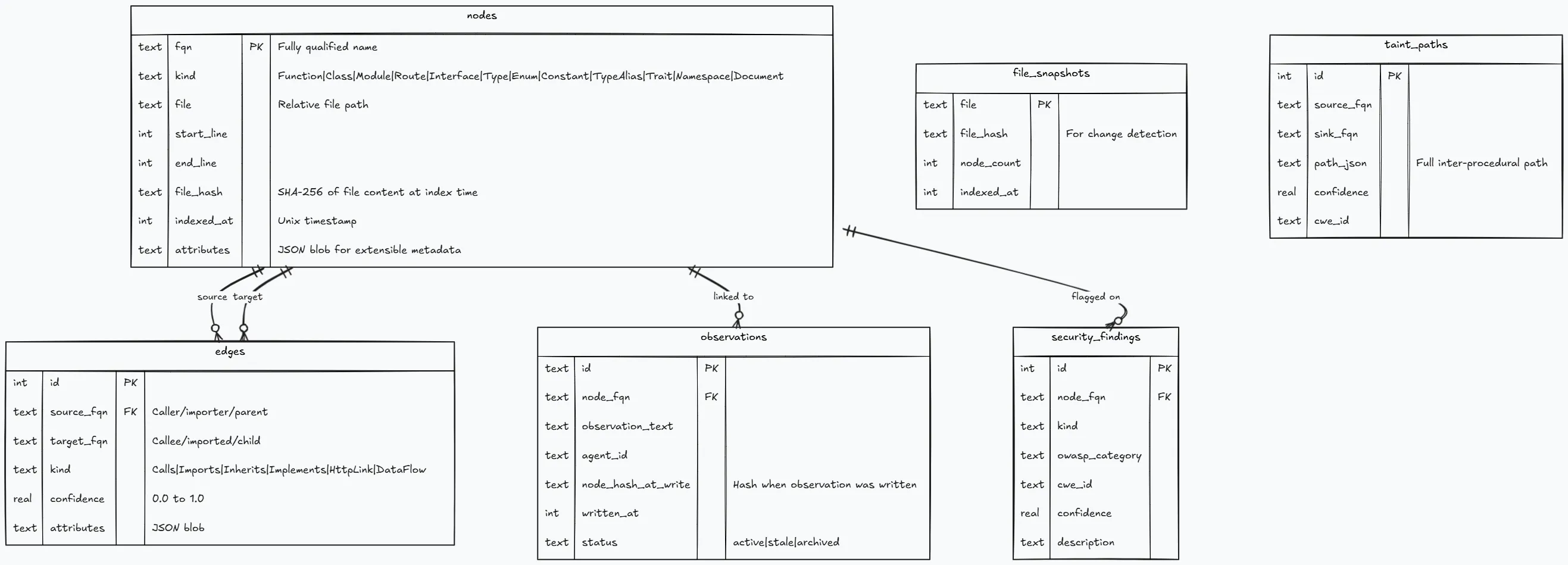
On top of the core tables, Cortex maintains:
- FTS5 virtual table (
nodes_fts) for full-text search over FQN, kind, file, and attributes. Uses theunicode61tokenizer with BM25 ranking (k1=1.2, b=0.75). Kept in sync via INSERT/UPDATE/DELETE triggers. - Vector embeddings table (
node_embeddings) for optional semantic search via sqlite-vec and a local ONNX model (nomic-embed-text-v1.5, 768-dimensional embeddings). - SBOM entries for dependency tracking extracted from lock files.
Smart tool routing & the 32 MCP toolsh2
Exposing 32 different tools to an agent creates a lot of context overhead. Each tool definition, along with its schema, description, and arguments, consumes tokens just to be present in the system prompt. Exposing all 32 tools costs approximately 4,000 to 6,000 tokens of the agent’s context window before the session even starts.
Smart mode (cortex serve --smart-tools) reduces this to just 5 tools. The ask meta-tool accepts a natural language question, extracts the user’s intent and symbol references, routes it internally to the appropriate graph queries, and returns a unified answer. The agent interacts with one tool instead of 32, dropping context overhead by 89%.
// Simplified routing logic from src/mcp/ask.rsfn route_question(question: &str) -> Vec<InternalTool> { if contains_pattern(question, &["what calls", "who calls"]) { vec![InternalTool::TraceCallers] } else if contains_pattern(question, &["what does", "call"]) { vec![InternalTool::TraceCallees] } else if contains_pattern(question, &["breaks", "impact", "change"]) { vec![InternalTool::BlastRadius] } else if contains_pattern(question, &["security", "taint", "vuln"]) { vec![InternalTool::FindTaintPaths, InternalTool::ScanOwasp] } else if contains_pattern(question, &["dead code", "unused"]) { vec![InternalTool::FindDeadCode] } else if contains_pattern(question, &["architecture", "overview"]) { vec![InternalTool::GetArchitecture] } else { // Fallback: search symbols + full text vec![InternalTool::SearchSymbols, InternalTool::SearchText] }}The tool categories cover:
| Category | Tools | What they answer |
|---|---|---|
| Structural | search_symbols, trace_callers, trace_callees, get_file_context, get_architecture, find_dead_code, blast_radius, detect_changes, get_code_snippet, query_graph | ”What is this? Who uses it? What depends on it?” |
| Search | search_text, semantic_search | ”Find me something by name or concept” |
| HTTP | get_http_routes, trace_http_call | ”What endpoints exist? Where does this call go?” |
| Security | find_taint_paths, scan_owasp, generate_sbom, check_dependencies | ”Is this code vulnerable? What are we importing?” |
| Memory | write_observation, read_observations, write_adr, read_adrs, prune_observations | ”Remember this. What did we learn before?” |
| Analysis | decompose_boundaries, get_complexity_hotspots, get_task_context, generate_steering, get_class_hierarchy, get_git_hotspots, get_import_graph, find_similar_functions | ”How is this codebase organized? Where are the risks?” |
Cross-session memory and why staleness mattersh2
This is the feature that separates Cortex from a static index. Every other tool in this space treats each session as independent. The agent starts fresh every time, forgetting what it learned about your codebase yesterday.
Cortex maintains a persistent memory layer. When an agent learns something about your code, it can write that observation to Cortex, linked to the specific code symbol’s fully qualified name. The observation persists in SQLite across sessions, agent restarts, and machine reboots.
The engineering challenge here is trust. If an agent wrote “this function uses HMAC-SHA256 for token validation” three weeks ago, and a developer has since changed the function to use Ed25519, that old observation is now wrong. An agent that blindly trusts old observations will make incorrect decisions.
Cortex solves this with staleness invalidation. Every observation records the node_hash_at_write, which is the SHA-256 hash of the linked code at the time the observation was written. When the indexer re-processes a file and detects that a node’s content hash has changed, it marks all linked observations as stale. The observation still surfaces in query results, but with is_stale: true so the agent knows to verify it before relying on it.
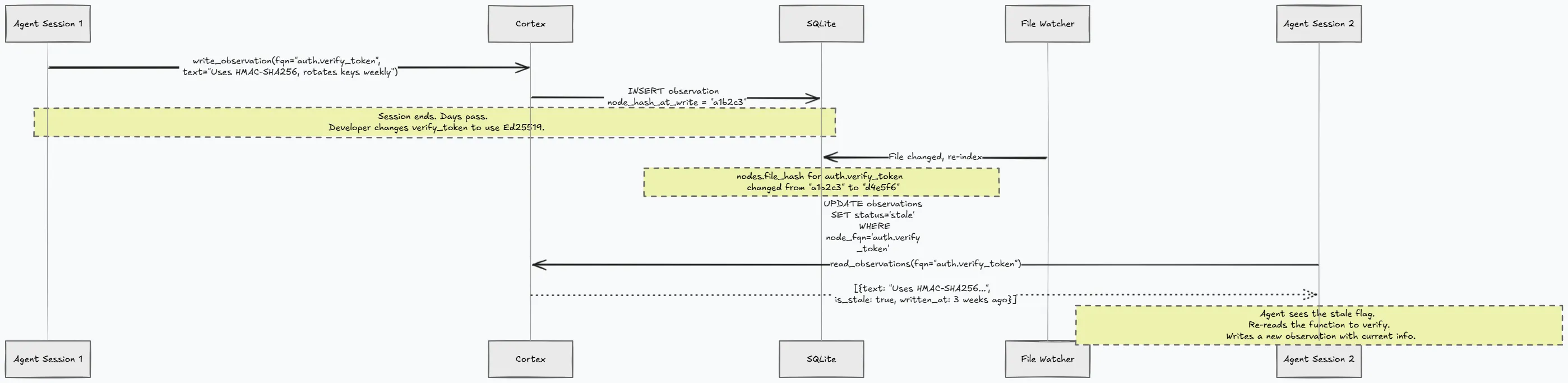
This creates a feedback loop. Agents build institutional knowledge about the codebase over time, and that knowledge degrades gracefully when the code changes. Stale observations are not deleted because they might still be partially correct or historically useful. They are simply flagged so the agent can make an informed decision.
Architectural Decision Records (ADRs) work the same way. An agent can record “we chose connection pooling over per-request connections because the connection setup latency was dominating request time” linked to the database module. Future agents can read these decisions and understand the reasoning behind the current architecture without asking the developer to explain it again.
For teams where multiple agents work on the same codebase, the memory layer becomes shared institutional knowledge. Agent A’s observations about the API contract are visible to Agent B when it is working on the frontend that consumes that API.
Security analysis on the structural graphh2
Most security scanning tools operate on one of two levels. Static analysis tools (Semgrep, CodeQL) pattern-match against source text or AST patterns within single files. Dynamic analysis tools probe running applications. Both require significant setup and often cloud infrastructure.
Cortex takes a different approach. It runs security analysis on the structural call graph that already exists from indexing. There is no additional scanning pass, no cloud APIs, and no paid subscriptions.
- Taint flow analysis: Traces data from user-input sources through the call graph to sensitive sinks. Sources include HTTP request parameters (Flask
request.args, FastAPI path parameters, Expressreq.body, Gor.FormValue), environment variables, and file reads. Sinks include raw SQL queries, file writes with user-controlled paths, and shell command execution (os.system,subprocess.run,exec). The analysis follows call edges up to depth 5 for inter-procedural propagation. If function A reads user input and passes it to function B which passes it to function C which executes a SQL query, Cortex traces that full path. - OWASP Top 10 pattern detection: Runs against the structural graph, not just regex over source text. It detects patterns for A01 (Broken Access Control, functions that access resources without checking permissions), A02 (Cryptographic Failures, use of weak algorithms or hardcoded keys), A03 (Injection, unsanitized input reaching query construction), and A04 (Insecure Design, missing validation on trust boundaries). Each finding includes a confidence score and CWE classification.
- SBOM generation: Generates software bills of materials in SPDX 2.3 format by extracting dependencies from the import graph and cross-referencing them with lock files. It reads Cargo.lock, package-lock.json, go.sum, requirements.txt, pyproject.toml, and Gemfile to get exact versions. The
check_dependenciestool then queries OSV.dev for known CVEs against those versions.
# Full security workflowcortex security scan          # taint flows + OWASP patternscortex security sbom          # SPDX 2.3 dependency listcortex security vulns         # cross-reference against OSV.dev (requires network)cortex security report        # human-readable summary of all findings
# CI integration with quality gatescortex ci --fail-on-taint --fail-on-owasp    # exit code 1 if issues foundcortex ci --fail-on-dead-code-above 15       # exit 1 if dead code exceeds 15%cortex ci --format json                       # machine-readable output for CI dashboards
The taint analysis is structural, not symbolic execution. It will not catch every vulnerability that a dedicated SAST tool like CodeQL would find. It does not reason about string concatenation patterns or complex control flow within a single function. But it catches the common inter-procedural patterns (unsanitized HTTP input reaching SQL queries across function boundaries, user data flowing through three function calls to reach command execution) with zero configuration and zero cloud dependencies. No other tool in this space offers any security analysis at all.
Hybrid search and why three layers matterh2
Search in Cortex is not a single mechanism. It is three layers that activate in sequence based on result quality.
- Layer 1: The graph index. When an agent calls
search_symbolswith a pattern like*UserService*, Cortex first tries exact and glob pattern matching against fully qualified names in the nodes table. This is fast and precise. If it returns 3 or more results, the search stops here. - Layer 2: FTS5 BM25. If the graph index returns fewer than 3 results, Cortex automatically falls back to full-text search over the FTS5 virtual table. This catches cases where the agent’s search term does not match the FQN pattern but does appear in the symbol name, file path, or attributes. BM25 ranking produces relevance-sorted results.
- Layer 3: Vector similarity (optional). When enabled via
cortex semantic enable, thesemantic_searchtool performs cosine similarity search over 768-dimensional embeddings generated by a local ONNX model (nomic-embed-text-v1.5). This handles conceptual queries like “find functions that handle authentication” where the word “authentication” might not appear in any symbol name.
Results from layers 1 and 2 are merged and deduplicated by FQN, sorted by confidence descending. The response includes _meta.retrieval_method (“graph”, “fts5”, or “hybrid”) so the agent knows how the results were found and can adjust its confidence accordingly.
The model for semantic search runs locally with no network calls after the initial 138 MB download, meaning it works in air-gapped environments. The embeddings are stored in SQLite via sqlite-vec, which is compiled as a loadable extension and statically linked into the binary. No external vector database is needed.
Multi-repo federation and cross-service intelligenceh2
Real projects are rarely a single repository. You have a frontend, a backend API, a shared library, maybe an auth service and a notification service. Each lives in its own repo. An agent working in the frontend repo has no visibility into the backend’s structure unless you give it that visibility.
cortex federate add ../auth-servicecortex federate add ../shared-libcortex federate add ../notification-servicecortex federate listEach federated repository must have its own .cortex/ directory (run cortex index there first). Once federated, all MCP queries search across all member repos transparently. “What calls AuthService.validateToken?” returns results from every repository in the federation.
The cross-service HTTP linking is where this gets interesting for microservice architectures. If the frontend makes a fetch("/api/users") call and the backend has a route handler registered for GET /api/users, Cortex creates an HttpLink edge between them with a confidence score. The agent can trace a request from the frontend button click through the API gateway to the backend handler to the database query, across repository boundaries, in one tool call.
For system engineers managing microservice architectures, this answers questions that normally require grepping through 15 repositories. “Which services are affected if I change the /api/auth/refresh endpoint?” becomes a single blast_radius query across the federation.
Build system awareness and module boundary detectionh2
Cortex understands workspace structures for five build systems:
- Cargo workspaces (Rust) by reading
Cargo.toml[workspace]members - npm workspaces (Node.js) by reading
package.jsonworkspacesfield - Go workspaces by reading
go.workfile - Gradle multi-module by reading
settings.gradle - Maven multi-module by reading parent
pom.xml
cortex modules --build-system shows workspace members as defined by the build configuration. This is the intended module structure.
cortex modules (without the flag) runs Leiden community detection on the call graph and shows clusters of tightly-coupled code based on actual call relationships. This is the actual module structure.
Comparing the two reveals architectural drift: code that the build system says belongs in module A but the call graph shows is actually tightly coupled to module B. This is the kind of insight that normally requires a senior architect spending a week with a whiteboard. Cortex produces it from graph analysis in under a second.
Git intelligence and risk scoringh2
Code that changes frequently and has many callers is the highest-risk code in any repository. A bug in that code affects the most downstream consumers, and a breaking change in that code requires the most coordination.
Cortex combines git commit history with the call graph to surface these hotspots:
cortex hotspots --months 6 --limit 20Risk score formula: churn_count * caller_count. A function that changed 15 times in 6 months and has 30 callers scores 450. A function that changed once and has 2 callers scores 2. The high-scoring functions are where bugs are most likely to appear and where changes have the widest blast radius. This is a direct measurement of volatility multiplied by impact.
Coverage gap analysis cross-references LCOV test coverage data with the call graph:
cortex coverage --lcov coverage.lcovThis produces a ranked list of untested functions sorted by how many other functions call them. An untested utility function with 50 callers is a higher-priority coverage gap than an untested leaf function with 0 callers. Standard coverage tools tell you what percentage of lines are covered. Cortex tells you which uncovered functions are the most dangerous to leave untested.
It supports LCOV files generated by cargo-tarpaulin, jest, pytest-cov, gcov, llvm-cov, istanbul, and any tool that produces standard LCOV format.
3D visualizationh2
cortex viz --export graph.htmlThis generates a standalone HTML file with an embedded 3D force-directed graph using 3d-force-graph. Nodes are colored by Leiden community assignment and sized by caller count. You can rotate, zoom, click nodes to see their details, and visually identify clusters and bottlenecks.
The visualization is self-contained. No server is needed after export; you can open the HTML file in any browser. It is useful for onboarding new team members, architecture review meetings, and identifying god classes (oversized nodes with dozens of edges).
For the interactive version during development, cortex viz --port 9749 starts a local HTTP server with live updates as the graph changes.
The bundle format and team sharingh2
cortex bundle export serializes the full graph (nodes, edges, observations, ADRs, security findings) to a JSON file called cortex.json. This file can be committed to git.
Why JSON and not the SQLite database file? Three reasons:
- JSON is diffable in pull requests. You can see what structural relationships changed between commits. “This PR added 3 new call edges to the auth module” is visible in the diff.
- Adding fields is backward-compatible. New versions of Cortex can add fields to the bundle without breaking old bundles. Old versions ignore unknown fields.
- Developers can read it. Open
cortex.jsonin any text editor and see the observations your team’s agents wrote, the architectural decisions recorded, and the security findings flagged. No SQLite client is needed.
# Developer A indexes and exportscortex index && cortex bundle exportgit add cortex.json && git commit -m "update graph bundle"
# Developer B pulls and imports (skips indexing entirely)git pull && cortex bundle importcortex serve   # ready to query immediately
For teams where not everyone wants to install Cortex locally, the bundle means the graph is available as a readable JSON artifact in the repository. CI can generate it on every push. The bundle also supports CCG (Code Context Graph) export format via --format ccg for interoperability with other tools.
Design decisions and the reasoning behind themh2
Why Rusth3
Not for the meme, but for three concrete engineering reasons:
- Single binary distribution:
cargo build --releaseproduces one executable with no runtime dependencies. No Python interpreter version conflicts, no Node.js, no JVM, and no Docker. The user downloads a binary and it works on their machine regardless of what else is installed. This matters because Cortex needs to run on developer machines with unpredictable environments, in CI containers, and on air-gapped workstations. - Tree-sitter FFI: Tree-sitter is a C library, and Rust’s FFI with C is zero-cost at runtime. The tree-sitter grammar crates compile their C sources via the
cccrate at build time and link statically. No dynamic library loading, no PATH issues, and no version conflicts between grammars. - Rayon for parallelism: Parsing 3,500 files needs to be fast. Rayon’s work-stealing thread pool makes parallel file parsing trivial. The code is essentially
files.par_iter().map(|f| parse(f)).collect(). There is no manual thread management, no async complexity for CPU-bound work, and no race conditions on the parser instances because each thread gets its own.
Why SQLite over a graph databaseh3
The obvious choice for a call graph would be Neo4j or DGraph or some purpose-built graph database. Cortex uses SQLite instead:
- Zero configuration: No server process to start, no connection strings to configure, no Docker compose files, and no port allocation. The database is a single file at
.cortex/graph.db. - WAL mode gives the exact concurrency pattern needed: Multiple concurrent readers (MCP tool calls) alongside a single writer (the indexer). No reader ever blocks, and the writer does not block readers.
- FTS5 is built in: Full-text search with BM25 ranking without deploying Elasticsearch or Meilisearch. One less dependency, one less process, and one less thing that can break.
- sqlite-vec for vectors: Optional semantic search without Pinecone or Qdrant. The vector index lives in the same database file.
- Portability: The database file works on every OS without conversion.
The tradeoff is that SQLite’s single-writer constraint means indexing writes are serial. In practice, this does not matter because the bottleneck is parsing (parallelized with Rayon), not writing. The write phase for a typical index run is under 50ms, while the parse phase is 500ms to 60 seconds depending on codebase size.
Why MCP over stdio instead of HTTPh3
The Model Context Protocol uses JSON-RPC 2.0 over stdio (stdin/stdout). This is the simplest possible transport:
- No port allocation conflicts (multiple Cortex instances can run simultaneously for different projects).
- No TLS certificate management.
- No firewall rules or CORS configuration.
- The agent process spawns Cortex as a child process and communicates via pipes.
Every MCP-compatible agent already knows how to do this. Cortex reads JSON from stdin, writes JSON to stdout, and logs to stderr. The protocol is stateless at the transport level, and state lives in the SQLite database, not in the connection.
Why not LSPh3
The Language Server Protocol (LSP) is designed for IDE features like autocomplete, go-to-definition, and hover information. It is optimized for single-file, cursor-position queries: “What is the type of the variable at line 42, column 15?”
Cortex answers cross-codebase structural questions: “What is the blast radius of changing this function?” “What are the module boundaries?” “Where does user input flow to SQL queries?” LSP has no concept of blast radius, community detection, taint flow analysis, or cross-session memory.
LSP also requires per-language server implementations (rust-analyzer for Rust, pyright for Python, tsserver for TypeScript, gopls for Go). Each is a separate process with its own memory footprint and startup time. Cortex handles 29 languages with one binary because tree-sitter grammars are language-agnostic at the API level.
The tradeoff is precision. LSP-based tools like Serena have exact type information. They know that foo is a Vec<String> and can resolve generic type parameters. Cortex knows that foo is a function that calls bar and is called by baz. For structural questions (callers, callees, blast radius, dead code), tree-sitter extraction is sufficient. For type-level questions, LSP is more accurate.
The tech stack in detailh2
| Component | Crate / Technology | Version | Purpose |
|---|---|---|---|
| CLI | clap (derive macros) | 4.x | Argument parsing, subcommand routing |
| Database | rusqlite (bundled) | 0.32 | SQLite with WAL, FTS5, compiled from source |
| Serialization | serde + serde_json | 1.x | JSON-RPC protocol, bundle format, config |
| Parsing | tree-sitter + 26 grammar crates | 0.25 | AST extraction for 26 languages |
| Parallelism | rayon | 1.x | Work-stealing thread pool for file parsing |
| Async runtime | tokio (full features) | 1.x | MCP server, concurrent tool handling |
| File watching | notify | 7.x | Native OS filesystem events |
| Hashing | sha2 | 0.10 | Content-based change detection |
| File walking | walkdir | 2.x | Recursive directory traversal with .gitignore |
| Pattern matching | regex | 1.x | Security pattern detection, taint source/sink matching |
| Error handling | anyhow + thiserror | 1.x / 2.x | Application errors vs. typed library errors |
| Logging | tracing + tracing-subscriber | 0.1 / 0.3 | Structured logging with env-filter and JSON output |
| Config | toml | 0.8 | .cortex/config.toml parsing |
| IDs | uuid (v4) | 1.x | Observation and ADR identifiers |
| HTTP server | axum + tower-http (optional) | 0.7 / 0.5 | Visualizer endpoint, CORS |
| ML inference | ort + tokenizers + ndarray (optional) | 2.0-rc / 0.21 / 0.16 | ONNX runtime for semantic embeddings |
The bundled feature on rusqlite means SQLite itself is compiled from C source and statically linked. This prevents system SQLite version conflicts, and the binary works on a fresh OS install with nothing else installed.
Optional features are gated behind Cargo feature flags. --features visualizer enables the axum HTTP server for the 3D graph UI. --features semantic enables ONNX inference for vector search. The default build includes neither, keeping the binary size around 25 MB with all 26 tree-sitter grammars statically linked.
Performance numbersh2
These are measured values from actual usage, not theoretical estimates:
| What | Measured | Context |
|---|---|---|
| Full index, 127 files, ~30K lines | 535ms | Typical web application |
| Full index, 3,500 files (CPython stdlib) | <60s | Large Python project |
| Incremental re-index, no changes | 13ms | Hash comparison only |
| Incremental re-index, 1 file changed | <15ms | Single file re-parse + write |
trace_callers query, depth 3 | <5ms | BFS over indexed edges |
get_architecture response size | ~1,000 tokens | Regardless of codebase size |
get_file_context response size | 500-800 tokens | vs. 15,000+ tokens for raw file |
| Token reduction on structural queries | 100x | 200 tokens vs. 20,000 tokens |
| Binary size, release build, stripped | ~25 MB | All grammars statically linked |
| Database size, 127-file project | ~2 MB | Nodes + edges + FTS5 index |
| First build from source | 3-5 minutes | Compiling all tree-sitter C sources |
| Incremental Rust build | 20-40 seconds | After initial compilation |
| MCP server startup | <100ms | Database open + schema check |
| Concurrent read connections | 1-16 (default 4) | Configurable via pool_size |
Full feature comparisonh2
This table compares Cortex against every relevant tool in the space based on what each tool actually ships today, not roadmap items:
| Feature | Cortex | LeanCTX | codebase-memory-mcp | Repomix |
|---|---|---|---|---|
| Architecture | Rust binary, SQLite | Rust binary | C binary, SQLite | Node.js CLI |
| Languages | 29 | 21 | 155 | N/A |
| MCP tools | 32 (or 5 smart) | 59 | 14 | 0 |
| Smart routing | Yes | No | No | N/A |
| Call graph tracing | BFS depth 5 | Partial | BFS depth 5 | No |
| HTTP linking | Yes | Yes | Yes | No |
| Dead code | Yes | No | Yes | No |
| Taint flow | Yes | No | No | No |
| OWASP scan | Yes | No | No | No |
| SBOM generation | Yes | No | No | No |
| Dependency check | Yes | No | No | No |
| Cross-session memory | Yes | Yes | No | No |
| Staleness invalidation | Yes | Yes | No | No |
| Multi-repo federation | Yes | No | No | No |
| Hybrid search | Yes | Yes | Graph only | No |
| CI quality gates | Yes | No | No | No |
| 3D visualization | Yes | No | Yes | No |
| Git hotspots | Yes | No | No | No |
| Coverage gap analysis | Yes | No | No | No |
| Community detection | Yes | No | No | No |
| Build system workspaces | Yes | No | No | No |
| Shell output compression | No | Yes | No | No |
| Delta reads | No | Yes | Partial | No |
| Token dashboard | No | Yes | No | Partial |
| Session resume | No | Yes | No | No |
| Single binary, zero deps | Yes | Yes | Yes | No |
| Auto IDE config | 25 agents | 28 agents | 8 agents | N/A |
| Portable bundle | Yes | No | No | Yes |
| CLAUDE.md generation | Yes | No | No | No |
| License | MIT | MIT + Apache 2.0 | MIT | MIT |
Cortex is strongest compared to the field in security analysis, staleness-aware memory, CI quality gates, coverage gap analysis, and the combination of graph intelligence with zero-dependency deployment.
Cortex is weaker in shell output compression (LeanCTX’s strongest feature), delta reads for repeated file access, token savings dashboards, and supporting fewer languages than codebase-memory-mcp.
Specific combinations that create compounding valueh2
Individual features are table stakes. The real engineering value comes from specific combinations that no single competitor offers in one binary:
- Graph intelligence + security analysis + CI gates: Cortex is the only tool that can answer “what calls this function?”, “does user input reach this SQL query?”, and “fail the build if taint flows exist” from the same graph in the same binary. Running
cortex ci --fail-on-taintin a GitHub Actions workflow means every PR gets structural security analysis without configuring heavy third-party enterprise security tooling. - Cross-session memory + staleness invalidation + ADRs: No other tool combines persistent agent memory with automatic trust degradation. This combination means an agent that has worked on your codebase for months builds genuine institutional knowledge that degrades gracefully instead of becoming silently wrong.
- Federation + HTTP linking + blast radius: For microservice architectures, this combination answers “if I change this endpoint in service A, what breaks in services B, C, and D?” in one tool call across repository boundaries.
- Leiden community detection + build system awareness + hotspot analysis: This combination produces a structural health report that would take a senior architect a week to assemble manually. You can see your actual module boundaries, where they diverge from intended boundaries, and where the highest-risk code lives, in one command, with zero LLM cost.
- Smart tool routing + token budget management + task context extraction: The agent describes its task. Cortex returns exactly the relevant subgraph sized to fit the agent’s remaining context budget. The agent starts working with full structural awareness without having read a single file.
Real usage patternsh2
Here is what using Cortex looks like in practice across different workflows.
Refactoring a legacy moduleh3
Before touching anything, understand the impact:
cortex impact LegacyAuth.validateSession --depth 5
# Output: 47 functions across 12 files depend on this# Risk: 3 taint paths flow through this function# Hotspot score: 340 (changed 17 times in 6 months, 20 callers)
# Check what the agent remembers about this codecortex memory show# Output: 2 observations (1 stale), 1 ADR about the auth migration plan
# Start the refactoring session with full contextcortex serve --smart-tools# Agent asks: "explain LegacyAuth.validateSession"# Cortex returns: callers, callees, observations, security flags in ~800 tokens
Onboarding to an unfamiliar codebaseh3
cortex index                    # 535ms for a typical projectcortex report                   # generates CORTEX_REPORT.md with full architecture overviewcortex viz --export graph.html  # visual map of the codebase structurecortex modules                  # shows module boundaries and coupling scores
# In your agent session:# "What is the architecture of this project?"# Cortex returns: languages, entry points, module structure, ~1000 tokens# vs. the agent reading 20+ files to figure this out
Security audit before a releaseh3
cortex security scan            # taint flows + OWASP patternscortex security vulns           # dependency CVEs from OSV.devcortex ci --fail-on-taint --fail-on-owasp --format json > security-report.json
# In CI (GitHub Actions):# - name: Security gate#   run: cortex ci --fail-on-taint --fail-on-owasp# Exit code 1 blocks the merge if issues exist
Microservice architecture analysish3
cortex federate add ../user-servicecortex federate add ../payment-servicecortex federate add ../notification-service
# Now queries span all services# "What calls PaymentService.processRefund?"# Returns callers from user-service AND notification-service
# "What HTTP routes exist across all services?"# Returns unified route map with cross-service links
Finding coverage gaps that matterh3
cortex coverage --lcov coverage.lcov --limit 20
# Output ranked by risk:# 1. db::connection_pool::acquire  | 0% covered | 47 callers# 2. auth::token::refresh          | 0% covered | 31 callers# 3. api::middleware::rate_limit   | 0% covered | 28 callers# ...# These are the functions where a bug would affect the most code
Configuration and tuningh2
Cortex reads configuration from environment variables (prefix CORTEX_) and a configuration file at .cortex/config.toml in the repository root. Environment variables override file values.
# .cortex/config.toml - all fields optional, defaults shownrepo_root = "."data_dir = ".cortex"log_level = "info"max_traversal_depth = 5 # max BFS depth for callers/callees/blast_radiusmax_graph_query_results = 500 # cap on query resultsauto_index = true # re-index on file changesupdate_check = true # check for new versions on startupauto_bundle_export = true # export cortex.json after each indexpool_size = 4 # read connections (1-16)additional_repos = [] # paths for multi-repo federationFor most projects, the defaults work without any configuration file. The only tuning most developers do is increasing pool_size if they have multiple agents querying simultaneously, or setting additional_repos for federation.
Supported platforms (all 25)h2
| Platform | Install command | Config location |
|---|---|---|
| Claude Code (Linux/Mac) | cortex install | ~/.claude/settings.json |
| Claude Code (Windows) | cortex install --platform claude-code | %APPDATA%\Claude\claude_desktop_config.json |
| Cursor | cortex cursor install | ~/.cursor/mcp.json |
| VS Code Copilot Chat | cortex vscode install | .vscode/mcp.json |
| GitHub Copilot CLI | cortex install --platform copilot | ~/.config/github-copilot/mcp.json |
| Windsurf | cortex install --platform windsurf | ~/.codeium/windsurf/mcp_config.json |
| Kiro IDE | cortex kiro install | ~/.kiro/settings/mcp.json |
| Zed | cortex install --platform zed | ~/.config/zed/settings.json |
| JetBrains | cortex install --platform jetbrains | ~/.config/github-copilot/mcp.json |
| Cline/Roo | cortex install --platform cline | .cline/mcp.json |
| OpenAI Codex | cortex install --platform codex | ~/.codex/mcp.json |
| OpenCode | cortex install --platform opencode | detected automatically |
| OpenClaw | cortex install --platform openclaw | detected automatically |
| Factory Droid | cortex install --platform droid | detected automatically |
| Trae | cortex install --platform trae | detected automatically |
| Trae CN | cortex install --platform trae-cn | detected automatically |
| Gemini CLI | cortex install --platform gemini | detected automatically |
| Hermes | cortex install --platform hermes | detected automatically |
| Kimi Code | cortex install --platform kimi | detected automatically |
| Pi coding agent | cortex install --platform pi | detected automatically |
| Google Antigravity | cortex antigravity install | detected automatically |
| Aider | cortex install --platform aider | detected automatically |
| Continue.dev | cortex install --platform continue | detected automatically |
| Supermaven | cortex install --platform supermaven | detected automatically |
| Tabnine | cortex install --platform tabnine | detected automatically |
The install command is idempotent. Running it again does not duplicate configuration; it merges the Cortex MCP server entry into existing config files without overwriting other settings.
What the future looks likeh2
Cortex 1.0 shipped in May 2026. The roadmap from here is informed by what the competitive landscape validates as high-value and what Cortex’s architecture makes uniquely possible.
Near-term (already in progress):
- Kotlin tree-sitter support (waiting for upstream updates to resolve version conflicts with older grammars).
- More granular taint propagation (tracking data flow through struct fields, not just function boundaries).
- Incremental bundle export (diff-based updates instead of full serialization).
Medium-term:
- Live collaboration mode: Multiple agents querying the same Cortex instance simultaneously with conflict-free observation writes.
- Graph diffing between branches: Not just “what files changed” but “what structural relationships changed” between
mainand a feature branch. - Custom tree-sitter queries: Let users define their own extraction patterns for domain-specific constructs (e.g., extracting GraphQL resolvers, React component props, database migration steps).
Long-term:
- Distributed federation: Query across repositories on different machines (currently federation requires local filesystem access).
- Temporal graph: Track how the call graph evolves over time, not just its current state. “When did this function gain 20 new callers?” “When did this module become coupled to that one?”
- Agent coordination: When multiple agents work on the same codebase, Cortex could mediate their observations and flag conflicts.
The core thesis does not change: agents need structure, not text. As models get larger context windows, the token savings become less about fitting within limits and more about signal-to-noise ratio. A 200-token graph result is not just cheaper than a 20,000-token file dump. It is also cleaner. The agent does not have to parse irrelevant code to find the structural answer.
Try ith2
# Install (downloads binary, detects your agents, writes MCP config)npx @1337xcode/cortex install
# Index your repositorycortex index
# Start using it - ask your agent structural questions# "What calls processOrder?"# "What breaks if I change DatabasePool.acquire?"# "Show me the security findings"# "What are the module boundaries?"# "Find dead code in this project"
Closing thoughtsh2
The AI coding agent space in 2026 is crowded with model improvements, prompt engineering techniques, and context window expansions. Most of that work happens at the model layer or the prompt layer. Almost nobody is working seriously on the data layer, the question of what information the agent actually receives and in what form.
Repomix gives agents everything at once. LeanCTX compresses what agents receive. Engram intercepts and summarizes. Context7 injects documentation. Each approach has merit. Cortex takes a different position: it pre-computes the structural relationships that agents need most frequently and serves them as compressed, queryable, persistent knowledge.
The problem Cortex solves is prominent but undertouched. Agents are memory-constrained like Jolyne under Jail House Lock. The solution is engineering, not bigger models. Give the agent a mirror that shows all the bullets at once instead of making it memorize them one by one.
The code is open. The license is MIT. The binary is free. If you are building AI coding tools, working with AI coding agents daily, or just tired of watching your agent burn 50,000 tokens to answer a question that should cost 200, give it a try. The graph does not lie.
Cortex is open source and licensed under the MIT license. The source code, npm package, and documentation are available on GitHub.
Further readingh2
- Model Context Protocol Specification - The official Model Context Protocol specification and documentation.
- CodexGraph: Bridging Large Language Models and Code Repositories via Code Graph Databases (Liu et al., 2024) - The academic work most aligned with Cortex’s core approach: extracting code graphs and querying them via structured interfaces rather than file reading.
- GraphCoder: Enhancing Repository-Level Code Completion via Code Context Graph-based Retrieval and Language Model (Liu et al., 2024) - Graph-based RAG for code completion showing +6.06 exact match improvement over sequence-based retrieval baselines.
- Context Rot: How Increasing Input Tokens Impacts LLM Performance (Chroma Research, 2025) - 18 frontier models, all showing measurable performance degradation as input length grows. The empirical case for why raw file reading hurts agent quality.
- Context Length Alone Hurts LLM Performance Despite Perfect Retrieval (2025) - Evidence that even with perfect retrieval, longer context degrades LLM output quality, strengthening the case for minimal, structured inputs.
- Reducing Token Usage of Software Engineering Agents (TU Wien, 2025) - Academic treatment of context management for software engineering agents, directly relevant to what Cortex addresses at the engineering layer.