

How I built a real-time Android vision system from scratch using YOLO, DeepSORT, and uinput.
I have decided to open source AimBuddy. Everything discussed in this post, the full native pipeline, training scripts, and docs, is now freely available on GitHub.
AimBuddy started as an experiment to see if a phone could run a full real-time vision pipeline entirely on-device. Screen capture, YOLO inference, multi-target tracking, and programmatic touch injection, all natively on a mobile GPU at 60 FPS with no PC tethering. It can, but the interesting problems weren’t where I expected them.
Running YOLO on a phone was the easy part. NCNN with Vulkan gives you GPU compute shaders and FP16 ALUs for free. The problems that actually ate months of dev time were in the glue between components. How do you keep latency honest when the SoC thermally throttles and your inference time doubles? How do you make a tracker that doesn’t flicker every time a detection disappears for a frame? How do you inject touch events that feel like a human input and not a machine gun?
This post covers the full technical stack with every design decision, actual code, and the problems that were painful to debug.
This is a research and educational project. All testing was done in controlled environments.
What AimBuddy actually ish2
There are two runtime modes, and the split between them is deliberate:
- Visual Assist (no root required) runs screen capture, YOLO inference, target tracking, and an ESP overlay. Works on any Android 11+ device.
- Assisted Input (root required) adds low-latency touch injection via Linux
uinputon top of the visual pipeline.
Root failure doesn’t crash the app. If /dev/uinput isn’t available or the grab fails, the visual pipeline keeps running and the touch layer just never starts. This matters during development when you’re constantly switching between root and non-root test devices.
The stack is Kotlin + Jetpack Compose for the Android UI layer, and C++ via JNI for everything on the hot path. The inference model is yolo26n, a nano-sized single-class detector from the YOLO26 family, running on NCNN with Vulkan compute.
The architectureh2

Four threads at runtime. The inference thread is pinned to the Cortex-X1 big core and the render thread to a Cortex-A78 core via sched_setaffinity. This is done through an RAII ESP::Thread wrapper that takes an affinity parameter at start:
bool start(int cpuAffinity = -1) {    cpuAffinity_ = cpuAffinity;    int result = pthread_create(&thread_, nullptr, threadEntry, this);    // ...}
// Inside threadEntry:cpu_set_t cpuset;CPU_ZERO(&cpuset);CPU_SET(thread->cpuAffinity_, &cpuset);sched_setaffinity(0, sizeof(cpu_set_t), &cpuset);
Pinning to specific cores on a big.LITTLE SoC is not optional for consistent timing. Without affinity, the scheduler freely migrates the inference thread between fast and slow cores, and your inference time oscillates wildly. That variance breaks the adaptive crop controller, which relies on stable EMA measurements to make decisions.
The inference and render threads don’t share a lock for frames. Data flows through a lock-free SPSC ring buffer from capture to inference, and through a std::mutex-protected copy from inference to render. The aim loop reads from the tracker under its own mutex. There’s no single choke point.
Capture: MediaProjection and HardwareBufferh2
Android’s MediaProjection API gives you a VirtualDisplay you can attach an ImageReader to. Each frame arrives as an AHardwareBuffer, which is a reference to GPU memory you can pass directly to native code without copying:
AHardwareBuffer* buffer = AHardwareBuffer_fromHardwareBuffer(env, hardwareBuffer);AHardwareBuffer_acquire(buffer);
ESP::Frame frame;frame.hardwareBuffer = buffer;frame.timestamp = timestamp;frame.width = g_captureWidth;frame.height = g_captureHeight;
if (!g_frameBuffer->push(frame)) {    AHardwareBuffer_release(buffer);    // drop count tracked in FrameBuffer for periodic telemetry}
Capture runs at 1280x720. Full 1080p doubles the preprocessing cost for no detection benefit since the model input is only 256x256. The pixels you’d gain are thrown away during the center crop and resize anyway.
The ring buffer has 8 slots, giving about 200ms of buffering headroom at 40+ FPS capture. You need this slack because inference occasionally takes longer than a single frame period, and you can’t let the capture thread block.
One thing I got burned by early on was the ImageReader buffer count. It’s configured with 3 max images:
constexpr int IMAGE_READER_MAX_IMAGES = 3;With 2 buffers, if inference is holding one and capture is writing another, the producer stalls. That tanks you from 60+ FPS to a lumpy ~30. Three buffers breaks that deadlock. It’s a classic producer-consumer problem, and it’s annoying to debug because the symptom looks like slow inference when it’s actually a buffer allocation bottleneck.
The inference loop: drain to latesth2
The inference thread doesn’t process frames in order. It drains the ring buffer to the newest available frame every iteration, deliberately dropping stale work:
if (g_frameBuffer && g_frameBuffer->pop(frame)) { ESP::Frame newer; uint64_t drainedThisIteration = 0; while (g_frameBuffer->pop(newer)) { if (frame.hardwareBuffer) { AHardwareBuffer_release(frame.hardwareBuffer); } frame = newer; drainedThisIteration++; } // run inference on freshest frame only}If the GPU is slow and frames pile up, processing them in order means you’re always behind reality. Dropping frames to stay current feels smoother and produces better tracking because the tracker’s velocity estimates are based on real-time deltas, not stale data.
When the inference loop has no frames, it doesn’t busy-wait. It uses exponential backoff starting at 200 microseconds and topping out at 2ms:
const auto sleepDuration = std::min(kNoFrameSleepMin * (1u << noFrameBackoffLevel), kNoFrameSleepMax);std::this_thread::sleep_for(sleepDuration);if (noFrameBackoffLevel < 4) ++noFrameBackoffLevel;When a frame arrives, noFrameBackoffLevel resets to 0 so the loop immediately returns to tight polling. This keeps CPU usage low when idle without adding latency when frames are flowing.
I track both average and EMA inference time per window of 120 frames, and the telemetry logs to logcat:
Pipeline stats: avg infer=7.2ms avg e2e=14.1ms ema infer=7.8ms ema e2e=15.3ms crop=352 drained=1 dropped_push=0If drained is consistently > 2 per window, something’s under pressure. If dropped_push is nonzero, the ring buffer is overflowing and you’re losing frames at the capture side.
Adaptive crop: treating crop size as a control variableh2
This is probably the most interesting optimization in the codebase. The center crop size going into inference is not fixed. It adjusts at runtime based on two pressure signals.
const bool backlogPressure = (drainedThisIteration > 0);const bool latencyPressure = (emaInferMs > kTargetCycleMs) || (emaEndToEndMs > kE2ePressureMs);
if (latencyPressure || backlogPressure) {    adaptiveCropSize = std::max(kMinAdaptiveCrop, adaptiveCropSize - kDownscaleStep);} else if (adaptiveCropSize < cachedCropSize) {    adaptiveCropSize = std::min(cachedCropSize, adaptiveCropSize + kUpscaleStep);}
Under load the crop shrinks quickly per iteration. When pressure clears it grows back slowly toward the FOV-derived target. The asymmetric step sizes prevent oscillation. Fast shrink, slow grow is the same idea behind TCP congestion control: respond to overload quickly but recover cautiously so you don’t immediately re-enter overload.
The crop size also adapts to the user’s configured FOV radius. When the FOV setting changes, the system recomputes the target crop by mapping FOV pixels through the screen-to-capture resolution ratio:
int targetSize = static_cast<int>(fovRadius * 2.0f);targetSize = std::max(256, std::min(targetSize, safeScreenWidth));const float scaleToCapture = static_cast<float>(Config::CAPTURE_WIDTH) / static_cast<float>(safeScreenWidth);int dynamicCropSize = static_cast<int>(targetSize * scaleToCapture);This means a small FOV setting automatically gives you a smaller crop and faster inference. The adaptive controller then further adjusts within that range based on runtime pressure.
NCNN and Vulkan: getting inference under 10msh2
NCNN is Tencent’s mobile inference framework. I use it instead of TFLite because it has first-class Vulkan support, which means I can run compute shaders on the GPU instead of the CPU. The difference is roughly 3x throughput and significantly less thermal output.
The NCNN configuration for Adreno GPUs:
net.opt.use_vulkan_compute = true;net.opt.use_fp16_packed = true;net.opt.use_fp16_storage = true;net.opt.use_fp16_arithmetic = true;net.opt.use_packing_layout = true;net.opt.lightmode = true;net.opt.num_threads = 4; // CPU fallback threadsFP16 packed + arithmetic is the important one for Adreno GPUs. They have native FP16 ALUs and you need all three flags to actually use them. Without them you’re doing FP32 compute and losing roughly half the throughput. The lightmode flag tells NCNN to release intermediate blob memory after each layer, which keeps the memory footprint under control.
The model input is 256x256, not the standard 640x640. The preprocessing chain from HardwareBuffer:

const float normVals[3] = {1/255.f, 1/255.f, 1/255.f};input.substract_mean_normalize(nullptr, normVals);One thing that bit me was model export format differences. Depending on how you export from Ultralytics, the NCNN blob names may or may not be present in the param file. I handle this with a name-first, index-fallback strategy:
int ret = -1;if (!useInputIndex_ && !inputBlobName_.empty()) { ret = ex.input(inputBlobName_.c_str(), input);}if (ret != 0) { useInputIndex_ = true; ret = ex.input(0, input); // index fallback}Once fallback is triggered, useInputIndex_ is cached so the name path isn’t retried every frame.
Training the modelh2
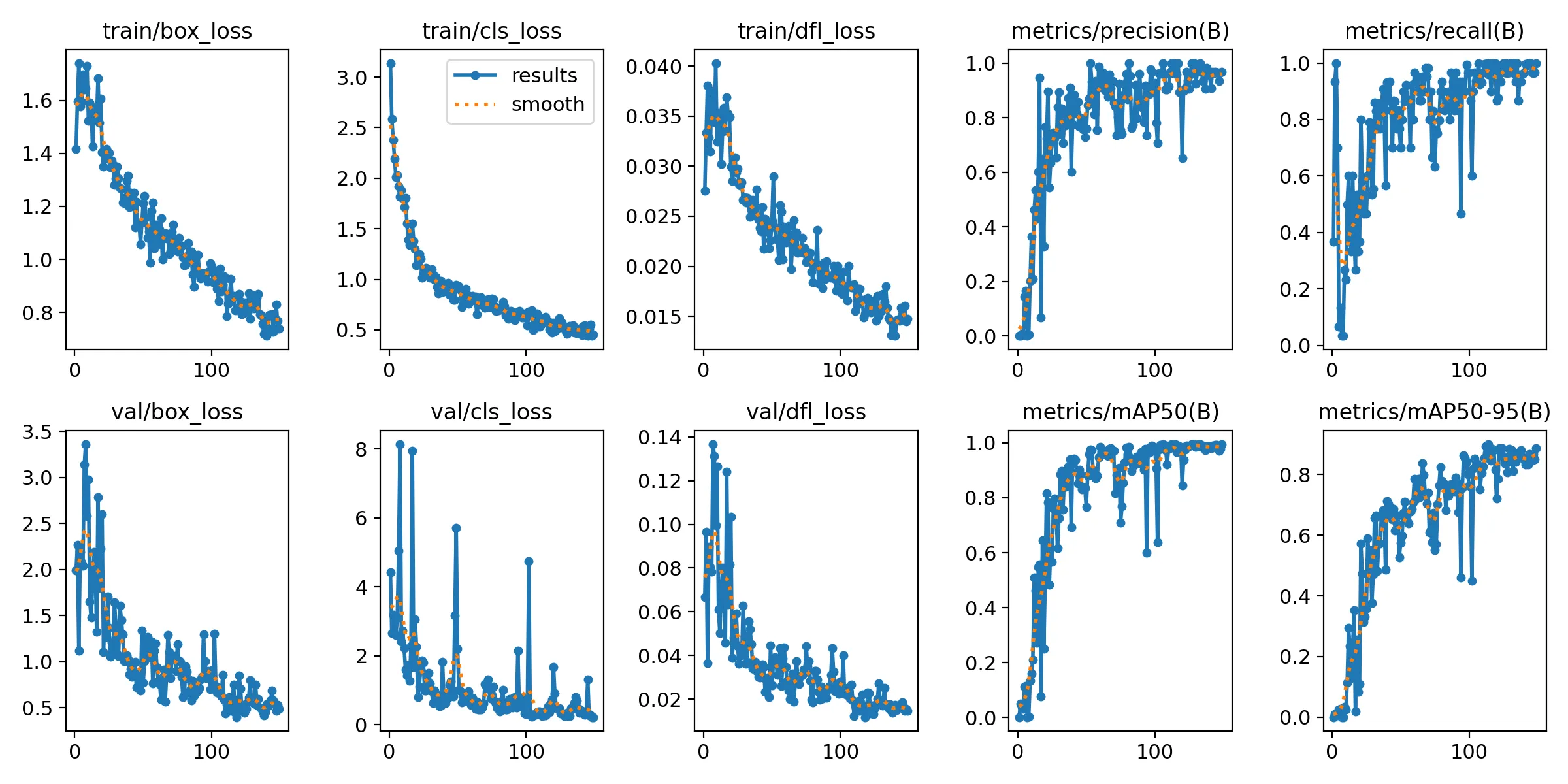
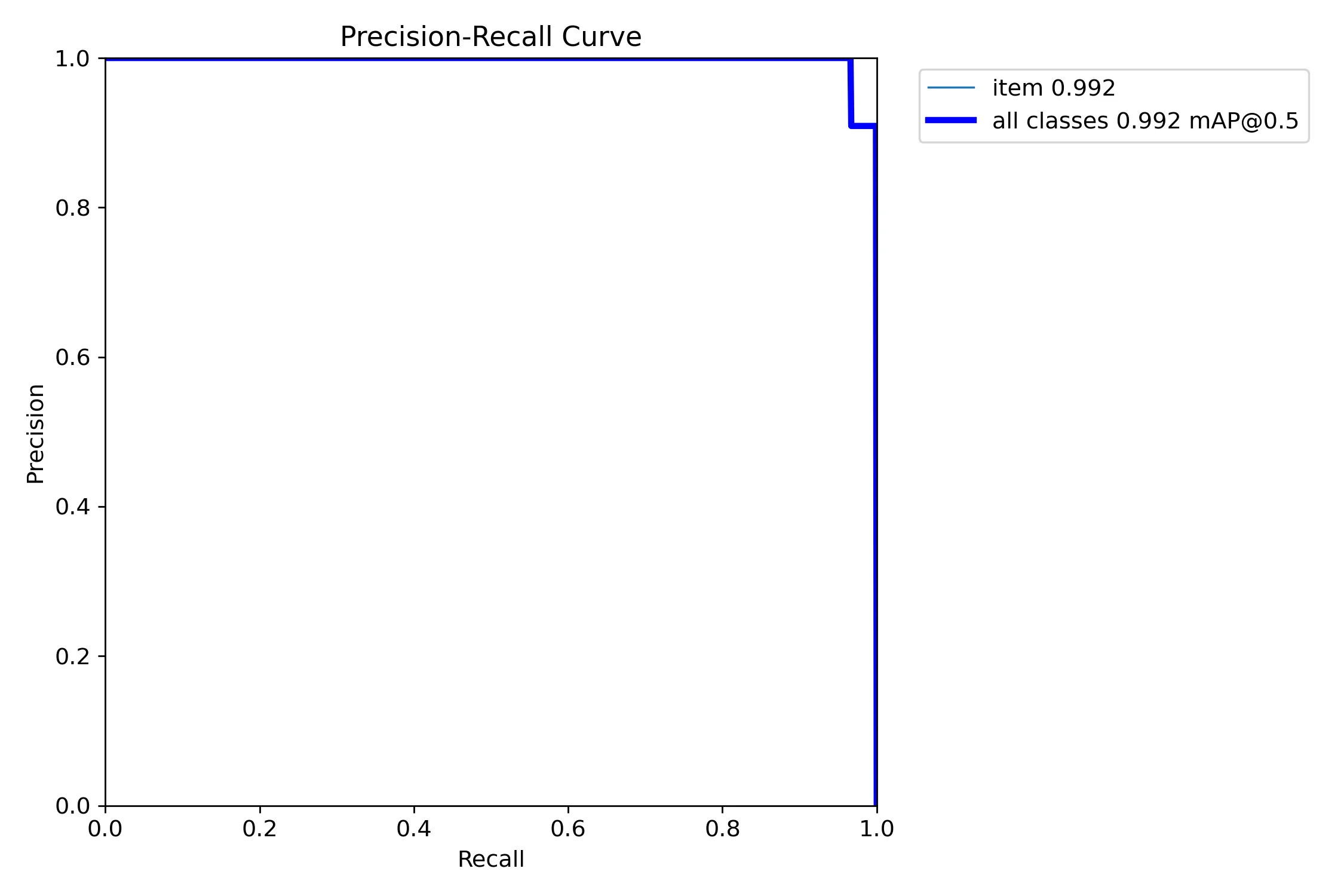
The model is yolo26n, a single-class detector. The training pipeline enforces yolo26n.pt as a hard contract in both train.py and download_base_model.py. Passing a different base model name errors out immediately:
if base_model.name.lower() != "yolo26n.pt": print("ERROR: base_model must be yolo26n.pt for this repository contract") return 2I enforce this because the NCNN export output filenames, the inference layer names, and the model input dimensions are all downstream assumptions. Swapping the base model breaks the contract silently if you let it through.
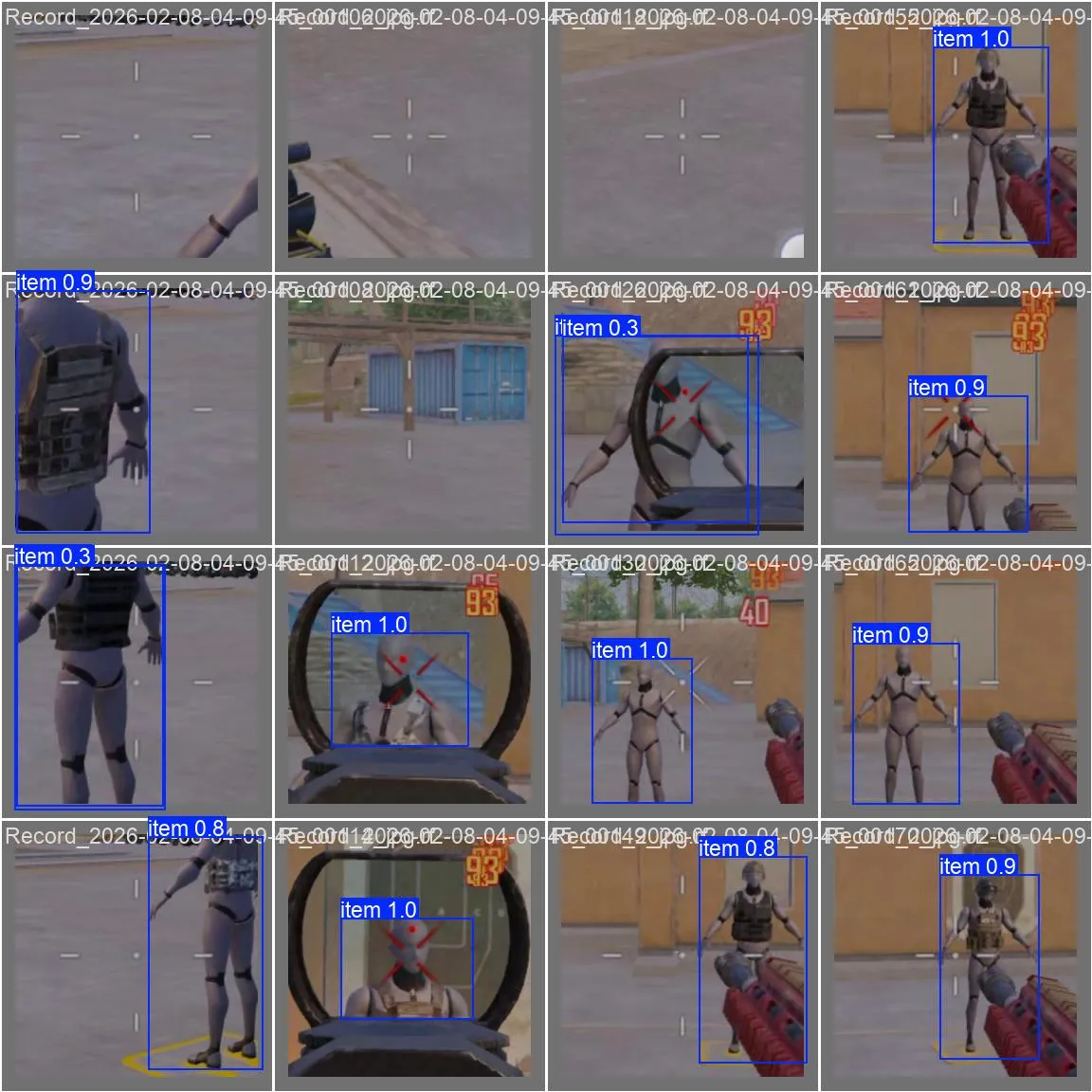
Training runs on Windows with Ultralytics + PyTorch. The dataset is frames extracted from screen recordings, auto-labeled with a pre-trained detector, then manually reviewed to fix mistakes.

NMS and postprocessingh2
YOLO outputs thousands of candidate boxes at multiple scales. Most overlap. NMS filters them to the best non-overlapping set by computing Intersection over Union between every pair and suppressing lower-confidence boxes that overlap above a threshold:
float iou(const BBox& a, const BBox& b) {    float x1 = std::max(a.left(), b.left());    float y1 = std::max(a.top(), b.top());    float x2 = std::min(a.right(), b.right());    float y2 = std::min(a.bottom(), b.bottom());
    float inter = std::max(0.f, x2-x1) * std::max(0.f, y2-y1);    return inter / (a.area() + b.area() - inter);}
After NMS, coordinates are remapped from model crop-space back to screen-space. This remapping is where coordinate system bugs hide. Off-by-one errors in the crop offset calculation show up as boxes that are consistently shifted by a few pixels in one direction, and it’s infuriating to track down because the detection itself looks correct.
The postprocessor also handles both transposed and non-transposed NCNN output layouts, since the format changed between Ultralytics export versions.
DeepSORT-style trackingh2
Raw YOLO detections are noisy. Boxes jump a few pixels each frame, sometimes disappear for a frame or two during partial occlusion. Reacting directly to raw detections produces jittery output. The tracker smooths this into stable identities.
I use a DeepSORT-inspired matching cascade. Instead of matching all detections to all tracks simultaneously, tracks are processed in order of increasing age (younger first). This prevents old occluded tracks from stealing detections that belong to recently-confirmed targets:
// Match tracks in order of increasing age (younger first)for (int currentAge = 0; currentAge <= maxAge; currentAge++) { for (int t = 0; t < numTracks; t++) { if (trkMatched[t]) continue; if (track.age != currentAge) continue; // ... find best detection match }}The matching score is a weighted combination of three signals:
float score = iou * 0.70f + centerScore * 0.22f + areaScore * 0.08f;if (isLockedTrack) score += 0.06f; // bias toward current lock70% IoU, 22% center distance, 8% area similarity. The locked target gets a small bonus, which makes the system sticky to its current target without being so sticky that it ignores a clearly better match.
Before matching, there’s also a spatial gate. If a detection’s center is too far from the track’s predicted position, it’s rejected without computing IoU at all. This prevents a track on the left of the screen from matching a detection that appeared on the right.
The real-time dt measurement is critical. A fixed timestep assumption breaks on Android because scheduling jitter is real:
float dt = 1.0f / 60.0f; // defaultif (m_lastUpdateNs > 0 && nowNs > m_lastUpdateNs) { dt = static_cast<float>(nowNs - m_lastUpdateNs) / 1'000'000'000.0f; dt = AimbotMath::clamp(dt, 1.0f / 120.0f, 1.0f / 20.0f);}Clamping dt between 1/120 and 1/20 prevents velocity estimates from exploding when scheduling hiccups cause a long gap between updates.
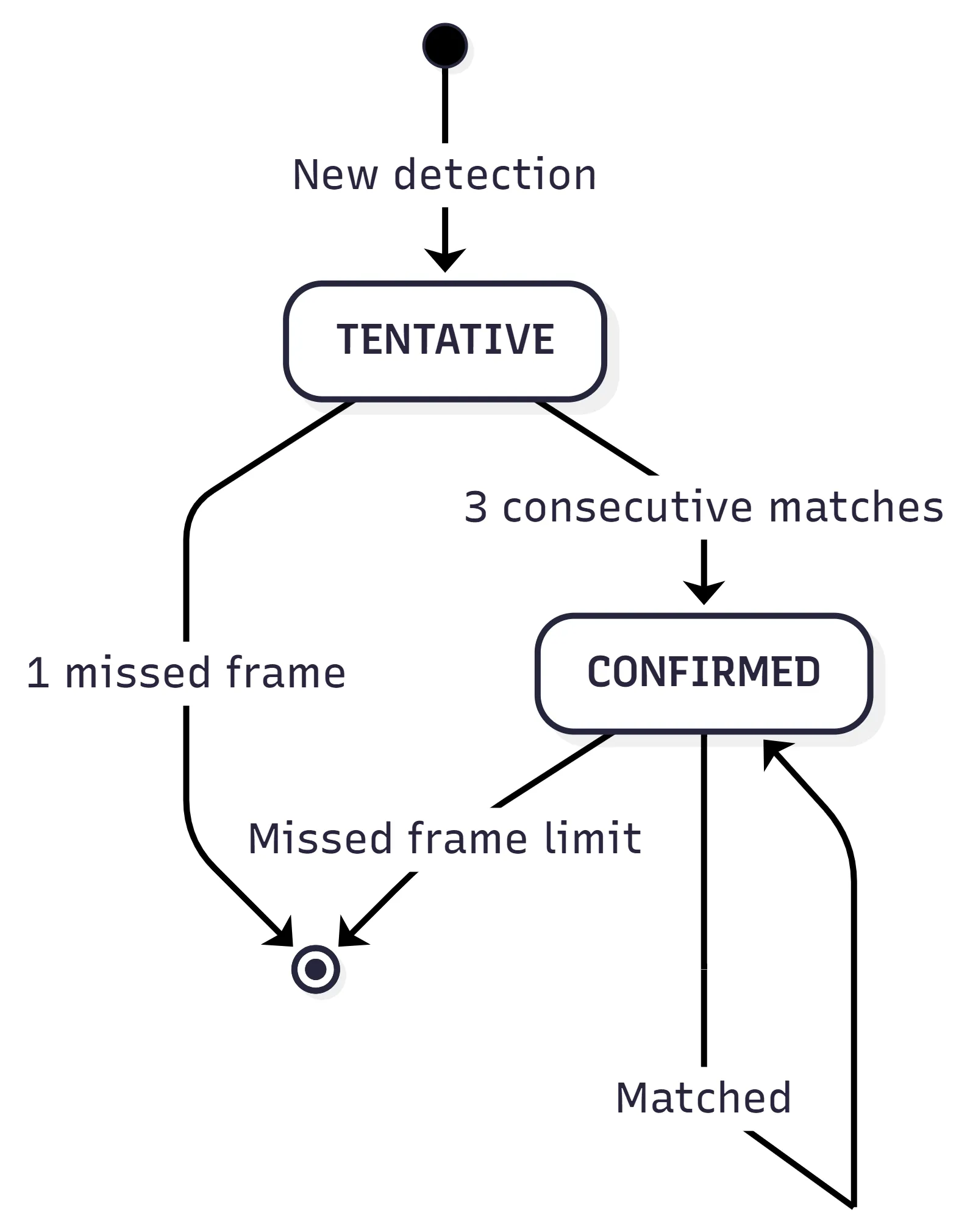
One-frame spurious detections never reach CONFIRMED state, so they never influence the controller. Three matches at 60 FPS is 50ms, short enough to feel responsive but long enough to filter garbage. Tentative tracks that miss even one frame are immediately removed (they never proved themselves), while confirmed tracks get a grace period.
Target selection has hysteresis. The locked target needs to be beaten by a significant margin before a switch happens, and there’s a cooldown on switches. The lock also needs to have matured for at least a few frames before a switch is even considered:
const bool cooldownReady = (m_switchCooldownFrames <= 0);const bool lockMatured = (m_lockFrameCount >= 4);bool canSwitch = cooldownReady && lockMatured;This prevents identity bouncing when two targets are at similar distances.
Velocity estimation and predictionh2
When a track goes unmatched, I predict where it should be using its EMA-smoothed velocity:
P_new = P_old + v_old * dtThe velocity EMA has confidence-aware blending. High-confidence detections get more influence on the velocity estimate. Mature tracks (many consecutive matches) use a slightly faster blending factor because they’ve proven stable:
const float conf = AimbotMath::clamp(detection.confidence, 0.0f, 1.0f);const float maturity = AimbotMath::clamp(static_cast<float>(track.consecutiveMatches) / 8.0f, 0.0f, 1.0f);const float dynamicSmoothing = AimbotMath::clamp(smoothing + (1.0f - conf) * 0.20f - maturity * 0.10f, 0.15f, 0.92f);There’s also a sub-pixel wobble suppression gate. If the detection center moved less than 0.9px from the previous frame, the velocity is forced to zero. Without this, detector quantization noise creates phantom velocity on stationary targets, which makes the lead prediction drift.
Velocity resets on large spatial jumps. If a detection appears far from where the predicted track should be, it’s almost certainly a different target, not the same one teleporting. When this happens, the EMA and Kalman filter states are also reset so the filters don’t try to interpolate across the discontinuity.
Aim control: three modes, a PD controller, and a lot of clampingh2
The controller reads from the tracker with a validated settings snapshot:
UnifiedSettings settingsSnapshot = g_settings;settingsSnapshot.validate();Shared settings can change mid-run from the ImGui menu on the render thread. A snapshot + validate gives each aim iteration a coherent, bounds-checked parameter set. Without this, you get undefined behavior from reading a struct that’s being partially written on another thread.
Three aim modes:
| Mode | Behavior | Best for |
|---|---|---|
| Smooth | PD controller with convergence damping | General use, natural feel |
| Snap | Gain-capped proportional (never exceeds 82% of distance per frame) | Fast acquisition |
| Magnetic | Distance-proportional pull (gentle near, stronger far) | Precision, minimal overshoot |
All three modes enforce an invariant: the movement vector can never point away from the target. This sounds obvious but it’s easy to violate with a derivative term. The controller checks this at multiple points in the pipeline:
// Never move away from the target directionif (outX * dx < 0.0f) outX = 0.0f;if (outY * dy < 0.0f) outY = 0.0f;The smooth mode uses a PD controller. I killed the integral term entirely:
u[n] = K_p * e[n] + K_d * (e[n] - e[n-1]) / dtIntegral windup is a real problem here. If the target is briefly occluded, the integral accumulates error during that period. When the target reappears you overshoot badly because the integral is trying to make up for all the “missed” time. PD without integral is more stable for a system where the target disappears unpredictably.
The smooth mode also has convergence damping: when the crosshair is close to the target, the proportional gain is squared and scaled down to a minimum of 20%. This prevents the characteristic oscillation you get from a fast PD controller at small error. Without it, the output bounces back and forth across the target at sub-pixel amplitude, which looks terrible at 60 FPS.
The derivative term has distance-dependent clamping:
const float derivativeClamp = AimbotMath::clamp(distance * 0.18f + 5.0f, 5.0f, 20.0f);derivativeX = AimbotMath::clamp(derivativeX, -derivativeClamp, derivativeClamp);derivativeY = AimbotMath::clamp(derivativeY, -derivativeClamp, derivativeClamp);At close range the clamp is tight so single-frame jitter can’t produce a large correction. At long range it opens up so the derivative can actually contribute to tracking moving targets.
Motion-gated lead predictionh3
The controller applies predictive lead based on the tracker’s velocity estimate, but only when the target is actually moving. There’s a three-part gate:
- Distance gate: lead scales from zero at close range to full at long range. No lead at point-blank because you don’t need it.
- Confidence gate: lead scales with detection confidence. Low-confidence detections produce noisy velocity, so don’t trust them for prediction.
- Motion speed gate: lead only kicks in when the target is actually moving above a minimum speed threshold. This is the critical one, because without it stationary targets drift due to detector quantization noise being fed through the velocity estimator.
Jitter suppression and movement smoothingh3
Small movements when already locked are suppressed with a quadratic ramp:
if (m_isAiming) { const float moveMag = std::sqrt(moveX * moveX + moveY * moveY); if (moveMag < 1.5f && moveMag > EPSILON) { const float jitterScale = moveMag / 1.5f; moveX *= jitterScale * jitterScale; moveY *= jitterScale * jitterScale; }}A 0.5px movement becomes 0.5 _ (0.5/1.5)^2 = 0.056px, essentially zero. A 1.4px movement becomes 1.4 _ (1.4/1.5)^2 = 1.22px, nearly unchanged. The quadratic curve gives a smooth transition between “kill this noise” and “let it through.”
Movement is also EMA-blended between frames and direction reversals under a small threshold are halved. On the first frame after touch-down, movement is dampened to prevent the initial acquisition from looking too snappy.
Touch radius clampingh3
The touch position is constrained to a circular region around the configured center:
if (distFromCenterSq > touchRadius * touchRadius) { const float distFromCenter = std::sqrt(distFromCenterSq); const float scale = touchRadius / distFromCenter; m_touchX = touchCenterX + distFromCenterX * scale; m_touchY = touchCenterY + distFromCenterY * scale;}If the accumulated touch position drifts too far from center, it gets projected back onto the circle boundary. This prevents the virtual finger from wandering off-screen during long tracking sequences.
The FOV gating has entry/exit hysteresis:
const float exitFovMultiplier = 1.2f;const float fovThreshold = m_isAiming ? (settings.fovRadius * exitFovMultiplier) : settings.fovRadius;Entry is at the configured FOV. Exit is 20% wider. Without this, a target on the FOV boundary makes the controller flicker on and off every frame.
Touch injection via uinputh2
This is the rootiest part of the system. The Linux kernel’s uinput driver lets you create a virtual input device that the OS treats identically to real hardware.
The grab + replay is what makes this work transparently. Real user touches still work because the reader thread forwards them. Injected touches are mixed in on a reserved slot so they don’t collide with real finger contacts.
One subtle detail: the application runs in landscape but the device’s touch panel reports in portrait coordinates. The touch helper does a 90-degree rotation with axis inversion:
// Game X (landscape long axis) -> Device Y (portrait long axis)long deviceY = gameX * (long)(g_touchDevice.touchYMax - g_touchDevice.touchYMin) / g_displayWidth;// Game Y (landscape short axis) -> Device X (portrait short axis)long deviceX = gameY * (long)(g_touchDevice.touchXMax - g_touchDevice.touchXMin) / g_displayHeight;// Y axis is invertedfinalY = (g_touchDevice.touchYMax - deviceY);finalX = deviceX + g_touchDevice.touchXMin;Getting this mapping right took several iterations. The first version sent touch events to the wrong quadrant because I had the Y inversion backwards.
Without a cooldown on injections, rapid successive events queue up inside the kernel and create a phantom input storm that looks like drift. The injection rate is clamped to prevent this.
Zero-allocation hot pathsh2
Android’s garbage collector can pause for 50ms+. At 60 FPS that’s 3 full frames. The entire hot path avoids heap allocation.
Detections and tracks use a fixed-capacity stack-allocated array:
template <typename T, int N>class FixedArray { T data[N]; int size = 0;public: bool push(const T& v) { if (size >= N) return false; data[size++] = v; return true; } void removeAt(int i) { data[i] = data[size-1]; // swap-remove: O(1) size--; }};The removeAt swap-remove is O(1) and order doesn’t matter for either detections or tracks at this point in the pipeline. In practice frames rarely have more than 5-10 detections, so the capacity limits are conservative.
The NCNN input mat is pre-allocated and reused every frame. The frame buffer ring is statically sized at startup. There are zero heap allocations in the inference, tracker, controller, and injection path.
Settings: validation before hot-path useh2
All runtime settings live in a UnifiedSettings struct, serialized to disk with a magic number check. The validate() method clamps everything before use:
fovRadius = (fovRadius < 50.0f) ? 50.0f : (fovRadius > 600.0f) ? 600.0f : fovRadius;if (aimFovRadius > fovRadius) { aimFovRadius = fovRadius; // semantic constraint, not just a numeric clamp}aimFovRadius <= fovRadius is a system contract. The aiming FOV can’t be wider than the detection FOV. If it were, the controller would try to target things that the detection pipeline can’t see, producing phantom movements toward nothing. Treating that as a logic rule rather than a UI constraint keeps the render overlay and targeting math in sync.
The ImGui settings menu shows measured overlay FPS, not assumed. I measure the real frame timing from the native tick cadence with EMA smoothing, rejecting pathological gaps from Android lifecycle events (app backgrounded then foregrounded).
Build configurationh2
The native layer compiles with C++17, -O3, LTO, and hidden symbol visibility. ARM64-specific flags:
target_compile_options(aimbuddy PRIVATE -march=armv8-a+fp+simd -O3 -fvisibility=hidden)NCNN is linked statically. Vulkan is linked conditionally based on NDK availability. On a big.LITTLE SoC the core layout matters: pinning inference to the performance core gives the most consistent timing and the highest single-thread throughput, while the render thread on a mid-tier core is fast enough for ImGui + overlay drawing without stealing cycles from inference.
Measured performanceh2
| Metric | Value |
|---|---|
| Average inference | ~7ms |
| P99 inference | ~12ms |
| End-to-end latency | ~15ms |
| Sustained framerate | 60 FPS |
| Memory footprint | ~80 MB |
Inference is the bottleneck. Tracking, control, injection, and rendering are rounding error by comparison. Thermal throttling pushes inference toward 12-15ms sustained, and the adaptive crop kicks in to manage it. Under sustained thermal load the crop automatically shrinks and inference stays within budget.
Things I’d changeh2
The ring buffer capacity is probably double what’s needed. The drain-to-latest behavior means you almost never have more than 2-3 buffered frames in practice. I sized it conservatively and it works, but it wastes memory.
The tracker’s O(n²) matching works for 5-10 detections per frame. For a crowded scene with 50+ detections it’d start to hurt. KD-tree spatial indexing would fix that but I never hit the problem so I never bothered.
The landscape-to-portrait coordinate rotation in touch_helper.cpp is hardcoded. It works for my test device but would need a proper orientation detection system for portability. Right now if you run it on a device with different axis mapping, the touch injection sends events to the wrong quadrant.
Killing the integral term was pragmatic. The tracker already has optional Kalman filtering for position smoothing, so combining a Kalman-filtered aim point with a full PID controller might give the best of both worlds.
This project was built for educational and research purposes only.
Further readingh2
- NCNN Vulkan notes - Official NCNN docs for Vulkan compute configuration.
- AHardwareBuffer NDK reference - Hardware buffer acquisition and locking.
- YOLO NCNN export guide - Ultralytics guide for NCNN model export.
- DeepSORT paper - The tracking algorithm that inspired the tracker design.
- Android uinput documentation - Linux kernel uinput interface reference.